
TL;DR

Get travel and outdoor gear delivered free with Prime
- Fast, free delivery on millions of items
- Prime Video, Amazon Music and more included
- Member-only deals all year
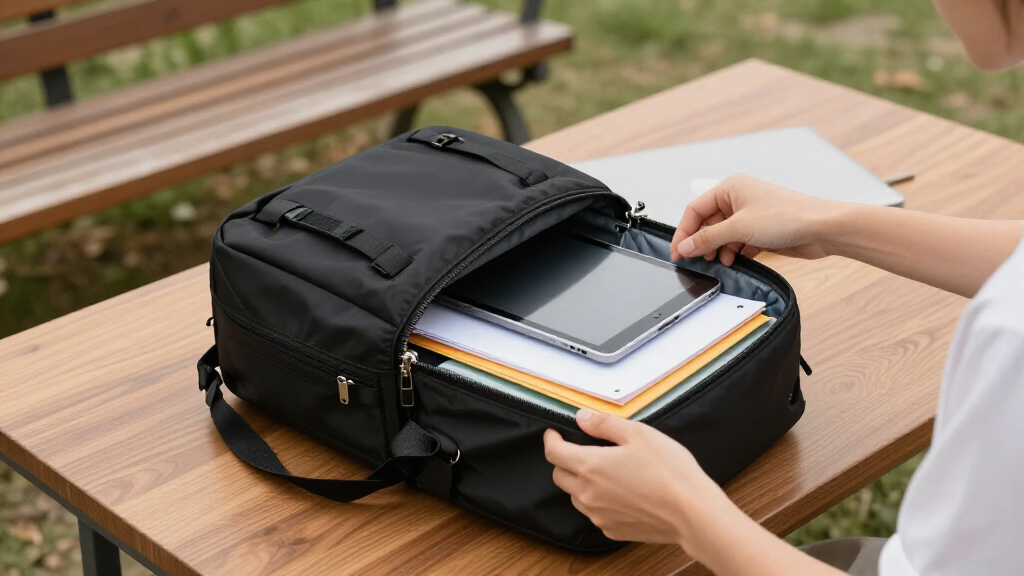
The ideal business backpack fits your laptop perfectly, keeps your papers flat, and is comfortable enough for daily commutes and travel. Focus on size, durability, and features like luggage pass-through and security pockets for hassle-free carrying.
Imagine arriving at a meeting, pulling out your sleek backpack, and everything inside is instantly accessible, protected, and organized. No fumbling, no wrinkled papers, no stress about tech damage. That’s the power of choosing the right business backpack.
Whether you’re commuting daily, traveling for work, or hopping between client meetings, your backpack needs to do more than hold your gear. It must safeguard your tech, keep your documents pristine, and look professional. But with so many options, how do you pick the one that ticks all those boxes? That’s what we’ll explore—how to find the perfect blend of protection, comfort, and style.
Always measure your device and check bag dimensions—buying a bag with a mismatched laptop sleeve is a common mistake.
Opt for a structured, padded compartment that suspends your tech to prevent impact damage.
Prioritize ergonomic features: padded straps, breathable panels, and luggage pass-through to stay comfortable.
Choose durable, weather-resistant fabrics like ballistic nylon or Cordura, and inspect stitching and zippers.
Pick a size and style that aligns with your travel needs—15–25 liters for daily use, with features like wide openings and security pockets.
Choosing the Ideal Business Backpack for Carrying Documents and Tech
The best business backpack makes every item feel instantly accessible. It fits your laptop precisely, keeps papers flat, protects against weather and stays comfortable through commutes, airports and client meetings.
Room for a laptop, documents, charger and daily essentials without unnecessary bulk.
Ergonomic straps and balanced organization matter more as mobile work kits grow.
A sleeve labeled “15-inch” may not fit every 15-inch device. Check exact dimensions.
Give tech and paper their own safe zones
A business bag should control movement inside the pack. Tech needs cushioning and suspension; documents need a rigid, flat surface; small accessories need dedicated anchors so they cannot scratch or crush either one.
Suspended laptop sleeve
Choose padding on every side and a false bottom that holds the device above the bag’s base. A snug fit prevents shifting during sudden stops or drops.
Structured document bay
A rigid divider or dedicated A4/letter sleeve keeps files flat and separates paper from hard devices, chargers and water bottles.
Soft pockets and cable loops
Fleece-lined pockets protect glasses, tablets and phones. Elastic loops and mesh pouches stop chargers, mice and power banks from roaming.
The most common buying mistake is a mismatched laptop sleeve. Measure the device’s width, height and depth—then compare those numbers with the compartment’s internal dimensions, not merely its advertised screen size.
What “business-ready” really means
Prioritize features that prevent expensive damage and daily frustration. Premium styling is useful only after the bag passes the fit, construction and comfort tests.
| Feature | Basic option | Business-ready target | Watch out |
|---|---|---|---|
| Laptop bay | ~ Light padding | ✓ Snug, suspended, soft-lined | ✗ Device rests on base |
| Documents | ~ Shared main cavity | ✓ Flat sleeve with rigid divider | ✗ Curved or unstructured pocket |
| Material | ~ Standard polyester | ✓ Ballistic nylon or Cordura | ✗ Weak seams or thin base |
| Weather | ~ DWR surface finish | ✓ Coating, sealed seams, guarded zips | ✗ “Waterproof” without detail |
| Comfort | ~ Straight padded straps | ✓ Contoured straps, mesh, sternum strap | ✗ Narrow straps on heavy bags |
| Travel | ~ Top handle | ✓ Pass-through, hidden pocket, lockable zips | ✗ Exposed passport pocket |
Design for the weight you actually carry
A laptop, charger, documents and water bottle commonly total 4–7 kg. Contoured straps, ventilation and close-to-body organization turn that load into a manageable commute instead of persistent shoulder tension.
Keep total carry below the strain zone
Use body-weight percentage as a practical packing signal, then adjust for fitness, distance and existing back concerns.
Four features that earn their space
Choose resilience without losing polish
The strongest business bags balance abrasion resistance, weather protection and a structured silhouette. Inspect stitching and zipper tracks closely: these are often the first construction points to fail.
Ballistic nylon
Best for: frequent travel and heavy daily use. Dense weave resists scuffs, abrasion and rough handling while remaining lighter than leather.
Cordura
Best for: urban commuting and adaptable work kits. Strong, practical and available in varied textures that can still look office-ready.
Full-grain leather
Best for: boardrooms and conservative settings. Polished and durable, but often 1.5–2.5 times heavier than nylon alternatives.
Weather reality: DWR coatings, sealed seams and YKK AquaGuard-style zippers help in a sudden downpour, but water-resistant does not mean submersible. A structured dark silhouette—black, navy or grey—adds professional versatility without compromising protection.
From measurement to meeting-ready
Follow this sequence in order. It prevents attractive but unsuitable bags from surviving the buying process.
Measure the device
Record width, height and depth with any protective case attached.
Verify protection
Confirm snug padding, a false bottom and separate paper storage.
Simulate the load
Pack 4–7 kg and test strap comfort, balance and ventilation.
Inspect construction
Check fabric, base reinforcement, stitching, seams and zippers.
Match the mission
Validate style, opening, security pockets and airline dimensions.
Fit first. Protect second. Style third.
The ideal bag is a 15–25 L structured backpack with a precisely fitted suspended sleeve, flat document compartment, ergonomic harness, weather-resistant construction and discreet travel security.
Measure before buying. Screen-size labels alone do not guarantee sleeve compatibility.
Separate fragile contents. Suspend tech and keep papers flat behind a rigid divider.
Test it fully loaded. Straps, ventilation and balance matter most at realistic weight.
Inspect failure points. Strong fabric cannot compensate for weak stitching or zippers.
Buy for the routine. Match capacity, security and presentation to daily work and travel.
How to Pick a Business Backpack That Protects Your Tech and Files
Protection starts with the right compartment. Look for a padded, suspended laptop sleeve—preferably with a ‘false bottom’—so your device doesn’t hit the ground when you set the bag down. This extra padding acts as a shock absorber, reducing the risk of damage from accidental drops or knocks, which are common during busy commutes or travel. For example, a 15.6″ MacBook Pro fits snugly in a dedicated sleeve of about 10.5″ x 15″ with 2″ of padding, ensuring a secure fit that prevents shifting and potential impact damage.
Documents need a flat, structured compartment, ideally with a rigid divider or a dedicated sleeve. This prevents papers from wrinkling or bending, especially when you’re rushing through airports or busy streets. Proper organization not only preserves the professional appearance of your papers but also allows quick access when needed, saving you time and frustration.
Pro tip: Always measure your tech device and compare it to the bag’s laptop compartment dimensions. The #1 reader mistake is buying a bag whose sleeve doesn’t match your device size—trust me, it’s frustrating to realize your 16″ laptop barely fits or is swimming in a too-large sleeve. A well-fitting compartment ensures your device is snug, protected from impact, and easy to retrieve.
Popular right now

Samsung 42-Inch Class OLED S90F 4K Smart TV (2025)

Samsung 42-Inch S90H OLED 4K Smart TV Bundle

Dyson V8 Cyclone Cordless Vacuum
As an affiliate, we earn on qualifying purchases.
The Exact Specs That Make a Backpack Truly Business-Ready
| Feature | What You Need |
|---|---|
| Capacity | 15–25 liters for daily use; 25–30 L if you also pack overnight essentials |
| Material | Ballistic nylon, Cordura, or high-denier polyester for durability; full-grain leather for formal settings |
| Water Resistance | Coated fabrics, water-repellent finishes, waterproof zippers (YKK AquaGuard). These features matter because they protect your gear from unexpected weather, preventing costly damage or the need to replace soaked electronics and documents. The tradeoff is that some water-resistant materials may be slightly heavier or less breathable, so balance durability with comfort. |
| Size | Check airline carry-on dimensions: roughly 45 x 35 x 20 cm; adjust based on your airline’s rules. Ensuring your backpack fits within these limits avoids last-minute gate checks or needing to check your bag, which can be inconvenient and risky for your belongings. |
How to Choose Comfort and Ergonomics That Won’t Hurt Your Back
Comfort is king when you’re carrying a loaded backpack. Opt for padded, contoured shoulder straps and a sternum strap for better weight distribution. These features help prevent shoulder strain and reduce fatigue, especially during long days or commutes. A breathable back panel with ventilation channels—think mesh and air flow—prevents sweat buildup during long walks or train rides, maintaining comfort and reducing odor buildup over time.
Imagine your daily 5 km walk to work. A backpack with well-padded straps and a snug fit means no pinching shoulders or sore spots. The weight of your gear—laptops, chargers, water bottles—can easily reach 4–7 kg. Proper ergonomics make sure that doesn’t turn into a backache or shoulder tension after hours of carrying. Over time, poor ergonomics can lead to chronic pain or posture issues, so investing in a well-designed bag pays off in long-term health.
Luggage pass-through straps are a game-changer for travelers—slip your backpack over your rolling suitcase handle and glide through terminals effortlessly. This feature reduces strain on your shoulders and arms, making transit smoother and less tiring.
Durability and Weather Resistance: What Really Holds Up
Choose fabrics like ballistic nylon or Cordura for abrasion resistance. These materials are engineered to withstand rough handling, such as being tossed into car trunks or crowded subway racks, without tearing or fraying. For formal settings, a leather backpack offers durability but adds weight—around 1.5 to 2.5 times more than nylon models—so consider your comfort and daily weight limits. Water resistance is about more than just a rain shower; look for sealed seams, coated zippers, and water-repellent finishes because they prevent water ingress that can damage electronics and papers. For example, a backpack with YKK AquaGuard zippers and a DWR coating will keep your gear dry in a sudden downpour. But don’t expect it to be waterproof—submersion and heavy flooding are still a no-go. Checking the stitching quality and zipper durability is crucial because these are common failure points, especially if you’re packing daily or traveling often. Investing in well-made materials and construction reduces replacement costs and protects your valuable belongings over time.
Making Your Backpack Look Professional Without Sacrificing Style
Structured silhouettes that hold their shape when set down scream professionalism. They convey stability and confidence, which are important in business settings. Stick to dark, neutral colors like black, navy, or grey—these blend seamlessly into corporate environments, signaling seriousness and professionalism. For creative industries, you can experiment with more casual or textured fabrics, but stay away from flashy logos or bright colors if you want to look sharp in meetings. Imagine walking into a client’s office with a sleek, minimalist black leather backpack—instantly elevating your presence. Minimal external branding also adds to a clean, professional look, avoiding distractions and ensuring your appearance remains polished and appropriate for any professional occasion.
Capacity and Layout That Make Packing Easy and Efficient
The sweet spot for daily business use is around 15–25 liters. It’s enough space for a 15″ laptop, a folder of documents, charger, and a water bottle without feeling bulky. For overnight or travel, bump it to 25–30 liters to accommodate additional clothing or essentials. Look for wide-mouth or clamshell openings—think of a suitcase that opens flat. This design makes packing and retrieving items quick and easy, reducing frustration and saving time. Also, consider anti-theft features like hidden pockets, lockable zippers, and RFID-blocking compartments for added security. These features help protect your valuables and give peace of mind, especially when traveling in unfamiliar environments or crowded areas. A well-organized layout minimizes the need to dig through clutter, keeping you efficient and stress-free.
Will It Fit Under the Airplane Seat? How to Pick Travel-Friendly Size
Most airlines allow personal items measuring roughly 45 x 35 x 20 cm—think small, slim backpacks. Always double-check your airline’s specific dimensions before buying. A backpack that hits these marks can slip under the seat, making it easier to access your stuff during flights. Choosing the right size reduces the hassle of overhead storage, which can be crowded or hard to reach, and minimizes the risk of your bag being checked at the last minute. Imagine stowing your backpack under the seat in front of you during a long flight—no awkward stowing overhead or risking lost luggage. Selecting a travel-compatible size ensures smoother boarding and deplaning, keeping your essentials within easy reach and reducing travel stress.
Smart Features That Make Your Business Backpack Stand Out
Integrated USB ports, tracker pockets for AirTags, and luggage pass-through straps make a difference. For example, a backpack with a built-in USB pass-through allows you to connect your power bank inside the bag while charging your phone externally—no more tangled cables or rummaging through your bag for outlets. Many bags now include RFID-blocking pockets, so your cards stay safe from skimming and electronic theft. These features add convenience and peace of mind, especially if you commute daily or travel often. While these features enhance functionality, it’s important to ensure they don’t compromise the bag’s overall durability or security. Well-designed integrations should be sturdy, water-resistant, and unobtrusive, so they complement your professional appearance and daily routine without creating vulnerabilities or clutter.
Frequently Asked Questions
What size backpack fits a 15.6-inch laptop?
A 15.6-inch laptop typically fits in a sleeve measuring around 10.5″ x 15″ with at least 2″ of padding. Look for backpacks with internal compartments labeled for 15″ or 16″ devices to ensure a snug fit that protects your tech during daily commutes or travel.
Is a backpack professional enough for client meetings?
If you choose a structured, minimalist design in dark colors like black or navy, a backpack can look very professional. Leather or high-quality nylon bags with clean lines and minimal branding blend well into formal settings and convey credibility.
How do I keep documents from wrinkling in my backpack?
Use a rigid, flat compartment with a dedicated folder or file divider. Packing papers last and placing them in a separate, structured section prevents creases. Rolling or loosely stuffing papers increases the risk of wrinkles, so keep it flat whenever possible.
What features should I look for in a travel-friendly business backpack?
Check for a size that fits airline personal-item dimensions, wide-mouth openings for easy packing, luggage pass-through straps, and security features like RFID pockets. These elements make travel smoother and more secure.
Are backpacks with USB ports safe and worth it?
Built-in USB ports are convenient but only safe if the internal wiring is well-made and the port is protected from water and dust. They’re worth considering if you often work on the go, but ensure the port doesn’t compromise the bag’s durability or security.
Conclusion
Your perfect business backpack isn’t just about looks; it’s about how well it protects your tech, keeps your papers pristine, and fits your lifestyle. Focus on precise measurements, thoughtful features, and comfort.
Imagine stepping into your next meeting or flight—confident, organized, and ready. That’s what a well-chosen backpack delivers. Now, go measure your gear, compare your options, and find the one that makes your daily grind smoother—and more stylish.