
TL;DR

Get travel and outdoor gear delivered free with Prime
- Fast, free delivery on millions of items
- Prime Video, Amazon Music and more included
- Member-only deals all year
Luggage trackers using Bluetooth crowd networks and GPS can help you locate lost bags. Apple’s Find My network leads in size, but Android options are catching up with Google’s new network. Battery life, device compatibility, and privacy safeguards are key factors to consider.
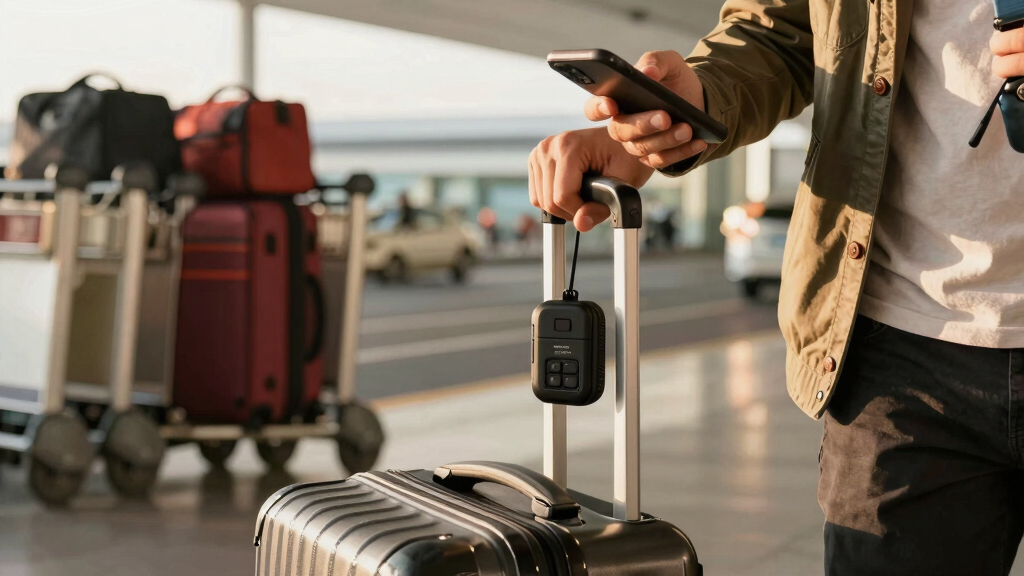
Imagine arriving at your destination and realizing your checked bag isn’t on the carousel. Your heart races. But what if you could see exactly where your bag is—thanks to a tiny device linked to your phone? That’s the promise of luggage trackers. They’re small, smart, and surprisingly reliable—if you pick the right one.
In this guide, you’ll learn how these trackers work, which platforms dominate the scene, and what practical factors matter on your next trip. Whether you’re a frequent flyer or planning a big vacation, understanding these tools can save stress, time, and even money.
Apple’s Find My network offers the largest crowd coverage, making AirTags the fastest for urban baggage recovery.
Bluetooth trackers last about a year on a small replaceable battery, ideal for long-term travel without recharging.
GPS trackers provide real-time updates anywhere but come with higher costs, larger size, and frequent recharging.
Compatibility with your phone (iOS or Android) determines which trackers fit your needs best.
Trackers aren’t a theft solution—they work best in city environments where passing phones can relay their location.
How Bluetooth and crowd networks make luggage tracking work
Bluetooth trackers like AirTag, Tile, and SmartTag don’t constantly ping your phone. Instead, they use nearby phones to pass along their location. When someone with an app-enabled phone walks past your bag, it anonymously relays the location back to you.
This system works wonders in cities, airports, and busy hotels. For example, a traveler in London found their lost suitcase within hours because hundreds of phones helped locate the tracker. But in remote areas or rural landscapes, the network’s silence can leave you guessing.
Some trackers add Ultra Wideband (UWB) tech, which offers arrow-guided, precise finding at close range—think of it like a GPS compass pointing you to your bag. Apple’s AirTag and Samsung’s SmartTag2 support this, giving you more confidence in crowded places.
As an affiliate, we earn on qualifying purchases.
Which platform offers the biggest crowd network? The battle for your bag’s location
| Network | Coverage Size | Compatibility | Pros | Cons |
|---|---|---|---|---|
| Apple Find My | Over 1 billion devices | iPhone, iPad, Mac | Fastest, most reliable, huge network | iOS only |
| Google Find My Device | Android phones (growing) | Android 6.0+ | Expanding network, no extra cost | Smaller than Apple’s, less mature |
| Tile & others | 10-20 million devices | iOS & Android | Wider device variety, cross-platform | Smaller network, slower find times |
For travelers with an iPhone, the Find My network is unbeatable. It’s like having access to a city-wide GPS, thanks to Apple’s ecosystem. Android users now benefit from Google’s network, which is still catching up but improving fast.
Bluetooth luggage tracker for Android
As an affiliate, we earn on qualifying purchases.
As an affiliate, we earn on qualifying purchases.
Real-world battery life and durability: what you need to know
Most luggage trackers run on tiny CR2032 batteries, which last about a year—no fuss, no recharging. For example, Apple’s AirTag claims 12 months of use before needing a replacement. SmartTag2 and Tile Mate are similar, with some claiming up to 18 months.
Durability matters, especially if your bag hits airport conveyor belts or rough terrain. IP67 water resistance protects against splashes and dust, making these devices suitable for rain or accidental spills. The loudspeaker’s volume is also key—if your bag’s under a pile of luggage, a loud beep helps you find it faster.
One traveler in New York swore by a SmartTag2 because its built-in loop made attachment easy, and it survived a rainy trip to the coast without a hitch.
GPS luggage tracker with real-time updates
As an affiliate, we earn on qualifying purchases.
As an affiliate, we earn on qualifying purchases.
GPS trackers vs. Bluetooth crowd networks: which is better for luggage?
Bluetooth crowd networks are built into trackers like AirTag and Tile—no subscription, small size, and a battery that lasts a year. They excel in airports, cities, and indoors where many phones pass by.
GPS trackers like Tracki or LugLoc send real-time locations via cellular signals. They work anywhere with coverage but require a monthly fee of around $5–$20. They’re larger, need recharging every few days, and are better suited for remote travel, road trips, or tracking valuables outside crowded urban zones.
A hiker in Colorado used a GPS tracker to locate their backpack miles from the nearest town. Meanwhile, a city-dwelling traveler relied on an AirTag for quick airport finds.
crowd-sourced luggage tracking device
As an affiliate, we earn on qualifying purchases.
As an affiliate, we earn on qualifying purchases.
How to set up and use your luggage tracker effectively
- Choose a tracker compatible with your phone: iPhone → AirTag; Android → SmartTag2 or Chipolo.
- Activate the device following the manufacturer’s instructions—usually a quick pairing in the app or via the phone’s settings.
- Attach it securely inside your bag, ideally in a pocket or seam where it won’t fall out.
- Enable location sharing if available, and set up notifications for when your bag is out of range.
- Test the system before your trip—walk away with your bag and see if it updates in your app.
This simple routine saves hassle during travel. For example, a frequent flyer in Tokyo tested her AirTag on a recent trip, confirming she could track her checked bag from check-in to baggage claim.
What trackers can’t do — and what to keep in mind
Bluetooth trackers can’t give you real-time updates during your flight or in remote areas. They rely on passing phones, so their accuracy drops in rural zones or over oceans.
They can’t guarantee the recovery of stolen luggage, but they can show you the last known location if someone passes by your bag. Anti-stalking features alert users if unknown trackers are traveling with them—helpful for privacy but not for theft recovery.
Always remember: these devices are tools, not miracle solutions. They’re best for peace of mind and quick recovery in urban environments, not for avoiding theft or tracking your luggage mid-flight.
Frequently Asked Questions
Are luggage trackers legal in checked bags?
Yes. TSA, FAA, and EASA all approve Bluetooth trackers like AirTag and Tile for checked luggage. The small CR2032 batteries are well below airline lithium battery limits, making them safe for air travel.
Which tracker should I choose if I use an Android phone?
Google’s Find My Device network is now available on select Android trackers like Chipolo One Point and Pebblebee. These work well in cities and are improving, but their network size still lags behind Apple’s in many areas.
Can I track my luggage during the flight?
No. Bluetooth trackers only update when near passing phones. If your bag is in the cargo hold, it won’t send updates until it’s back in a populated area or on the ground near compatible devices.
Do I need a subscription for GPS trackers?
Yes. GPS trackers like LugLoc or Tracki typically require a monthly fee ($5–$20). Bluetooth trackers don’t need any subscription for basic features, making them more budget-friendly for most travelers.
Will a tracker keep working if my bag is stolen?
It can help locate your bag if it’s moved. But it’s not a theft recovery tool. Plus, anti-stalking alerts may notify someone if the tracker is traveling with them without permission.
Conclusion
Choosing the right luggage tracker isn’t just about hardware; it’s about matching your travel style and device ecosystem. Apple’s Find My network dominates in cities, but Android users aren’t left out—Google’s new network is closing the gap.
Remember, these tools are for peace of mind, not foolproof theft recovery. When you pack your bag, tuck in a tracker that aligns with your phone, and enjoy your trip without the nagging worry about lost luggage.
Fall Picks
fall essentials
As an affiliate, we earn on qualifying purchases.