
TL;DR

Get travel and outdoor gear delivered free — and shop member deals
- Fast, free delivery on millions of items
- Access to Prime Big Deal Days deals on October 6–7
- Prime Video, Amazon Music and more included
The best travel backpacks with integrated laptop sleeves balance size, durability, and security, fitting airline carry-on rules. Look for features like water resistance, padded compartments, and organizational pockets to keep tech safe and accessible.
Imagine sprinting through the airport, laptop safely stashed in a sleek backpack that fits perfectly under your seat. The right travel backpack isn’t just about looks; it’s about smart design, security, and comfort. If you’ve ever wrestled with bulky bags or worried about damaging your tech, this guide will show you what to look for.
We’re breaking down the best options — backpacks that protect your laptop, meet airline carry-on rules, and feel good to carry. Whether you’re a digital nomad, a business traveler, or a weekend adventurer, knowing what features matter makes your trips smoother and less stressful.
The Best Travel Backpacks with Integrated Laptop Sleeves
The right backpack protects your laptop, stays within airline limits and remains comfortable from curb to gate. Prioritize fit, weather resistance, organization and security—not excess bulk.
Protection starts with the sleeve
A laptop-size label is only the beginning. The compartment should absorb impact, prevent scratches and hold the device securely without making removal difficult at airport security.
Padded on every side
Dense padding and a soft lining reduce shock and abrasion. A suspended base is especially useful because it keeps the laptop above the bag’s impact zone.
Secure, never strained
A sleeve that is too tight stresses the device and slows access. One that is too loose allows movement. Compare actual device dimensions—not screen size alone.
A separate tech route
A dedicated opening lets you retrieve electronics without disturbing clothing or exposing valuables. Check that zippers open widely and cannot scrape the device.
For a typical 15-inch laptop: allow roughly half an inch beyond the measured height and width for padding and smooth insertion. Always verify the manufacturer’s internal sleeve dimensions.
The airline-friendly sizing sequence
Carry-on policies vary, so confirm the exact rules for every airline and fare. A compact 20 × 12 × 7-inch backpack is a practical reference point for travelers seeking easier overhead-bin or under-seat placement.
Measure the device
Record laptop width, height and thickness with a tape measure.
Check sleeve space
Compare measurements with the compartment’s internal dimensions.
Check bag exterior
Use packed external dimensions, including full pockets and handles.
Match the airline
Confirm carry-on or personal-item rules before departure.
Dimension snapshot
Relative bars compare a common compact reference bag with frequently cited maximum carry-on dimensions.
Match the bag to the journey
The “best” backpack changes with trip length and working style. More volume adds flexibility, but it can also increase weight, bulk and the temptation to overpack.
| Traveler profile | Priority | Best-fit feature set | Main tradeoff |
|---|---|---|---|
| Business traveler | Fast access and polished appearance | ✓Clamshell opening, document panel, structured tech zone | Structured designs may weigh more |
| Digital nomad | Tech organization and all-day comfort | ✓Cable pockets, suspended sleeve, ergonomic harness | Extra organization can reduce open packing space |
| Weekend traveler | Compact versatility | ✓20 × 12 × 7-inch reference size, flexible main cavity | Less room for shoes or bulky layers |
| Adventure traveler | Weather and abrasion resistance | ✓High-denier fabric, coated zippers, reinforced stitching | Rugged materials may feel less formal |
Shortlist names often associated with this category: Nomatic / Peak Design / eBags / Thule / Samsonite
Durability, security and what comes next
Modern backpacks have moved beyond simple storage. The strongest designs combine resilient materials, layered theft deterrence, better ergonomics and increasingly modular tech features.
Security stack
Feature evolution
A five-check buying trace
Follow the decision chain in order. A bag that fails the first two checks is unlikely to become a good travel companion, regardless of styling or extra features.
The best bag disappears into the journey.
Choose enough structure to protect your device, enough capacity for your real packing list and no more complexity than you will use. Comfort and compliance will matter longer than novelty.
Quick answers before checkout
Use manufacturer measurements and current airline policies as the final authority. Screen-size labels and generic “carry-on approved” claims are not precise enough on their own.
How should I measure my laptop?
Measure its full width, height and thickness. Compare those figures with the sleeve’s internal dimensions and leave roughly half an inch for padding and access.
Can one bag work for commuting and travel?
Yes. Look for a compact exterior, a professional silhouette, a separate tech compartment and a main cavity flexible enough for clothing.
Which materials are most durable?
High-denier nylon or polyester with water-resistant treatment, protected zippers and reinforced stitching offers a strong everyday balance.
Are sustainable options available?
Yes. Recycled fabrics and lower-impact manufacturing are increasingly common; verify durability, repairability and credible material disclosures.
How to Pick a Travel Backpack That Protects Your Laptop
Choosing a backpack with a built-in laptop sleeve isn’t just about size. It’s about how well it protects your tech and how that protection impacts your travel experience. Padded, fleece-lined compartments are crucial because they absorb shocks and prevent scratches, which can significantly extend the lifespan of your device. The dimensions are also critical; a sleeve that’s too tight can be difficult to access or put your laptop under strain, while one that’s too loose offers less protection. For example, a 15-inch laptop generally requires a sleeve slightly larger than the device itself—about 15.5 inches tall and 11 inches wide—to accommodate padding and ease of insertion.
Material choice influences durability and weather resilience. Water-resistant nylon or polyester keeps your gear dry during unexpected rain, reducing the risk of water damage that can ruin electronics. Reinforced stitching at stress points adds longevity, especially when navigating busy airports or tossing the bag into overhead compartments. These protective features aren’t just about safeguarding your tech—they also reduce stress, knowing your device is less likely to be damaged or compromised during transit. The tradeoff is that highly padded or waterproof materials can add weight or cost, so consider your priorities and travel environment when choosing.
travel backpack with laptop sleeve
As an affiliate, we earn on qualifying purchases.
As an affiliate, we earn on qualifying purchases.
The Best Sizes & Dimensions for Airline-Friendly Travel
Most airlines stick to a carry-on size limit of 22 x 14 x 9 inches (56 x 36 x 23 cm), but the real challenge is finding a backpack that maximizes space without exceeding these limits. A backpack that’s too large can lead to extra fees or the hassle of gate-checking, while one that’s too small might not fit all essentials. The key is balancing capacity with compliance. For instance, a backpack measuring 20 x 12 x 7 inches typically fits comfortably in overhead bins and under seats, leaving some room for additional items without risking size violations.
Understanding the tradeoffs is essential: a slightly larger bag offers more room but might be harder to carry or fit within airline constraints, potentially leading to fees or delays. Conversely, a compact backpack forces you to pack efficiently but might limit your ability to carry everything you need. The goal is to choose a size that aligns with your travel style—whether you prefer to carry light for quick trips or need space for longer journeys—and ensures smooth boarding without surprises.
Think about your typical packing list—if you usually carry a 15-inch laptop, chargers, a change of clothes, and essentials, select a size that accommodates this without excess bulk. The right dimensions provide peace of mind, allowing you to move swiftly through airports and avoid the inconvenience of oversized luggage, which can be a game-changer for stress-free travel.
carry-on friendly backpack with padded laptop compartment
As an affiliate, we earn on qualifying purchases.
As an affiliate, we earn on qualifying purchases.
Understanding the Evolution of Travel Backpack Features
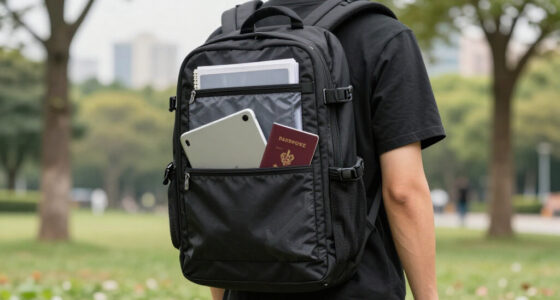
Travel backpacks have evolved significantly over the years, integrating innovative features that enhance security, comfort, and convenience. Early models focused mainly on capacity and durability, but modern designs now incorporate smart organizational compartments, anti-theft mechanisms, and tech-specific zones. For example, some backpacks now feature hidden pockets for passports and valuables, RFID-blocking fabric to prevent electronic theft, and quick-access panels for electronics. These advancements are driven by travelers’ needs for smarter, safer, and more efficient gear.
When choosing a backpack today, consider how these features can streamline your journey. A backpack with a dedicated tech zone keeps your laptop and accessories organized, while lockable zippers and hidden compartments add layers of security. As technology continues to advance, expect future designs to include even more integrated features like built-in chargers, biometric locks, and modular components. Staying informed about these trends helps you select a backpack that not only meets your current needs but also adapts to the evolving landscape of travel technology and security.
water-resistant travel backpack for laptops
As an affiliate, we earn on qualifying purchases.
As an affiliate, we earn on qualifying purchases.
What Materials Make a Backpack Durable and Weather-Resistant?
Durability and weather resistance go hand in hand. Look for backpacks made of high-denier nylon or polyester, which resist tears and abrasion. A backpack with a water-resistant coating or waterproof zippers keeps your laptop safe during sudden downpours or airport delays.
Picture the rain pouring as you rush between terminals, your backpack’s coated fabric repelling water while your laptop stays dry inside. Reinforced stitching at stress points adds extra longevity, especially when you’re cramming it into overhead bins or tossing it into a trunk.
business travel backpack with organizational pockets
As an affiliate, we earn on qualifying purchases.
As an affiliate, we earn on qualifying purchases.
Security Features That Keep Your Tech Safe on the Go
Security is critical when traveling. Lockable zippers prevent pickpocketing. Hidden compartments hold valuables away from prying eyes. RFID-blocking pockets guard against electronic theft — especially when using public Wi-Fi or crowded airports.
Imagine sharing a cab in a busy city, your backpack’s hidden pocket holding your passport and wallet. Lockable zippers mean you can leave it at your hotel or café table without worries.
Choose models with anti-theft features if you often travel in high-risk areas. These small additions make a big difference in peace of mind.
Frequently Asked Questions
How do I measure my laptop for the right sleeve fit?
Use a tape measure to find the height, width, and thickness of your device. Match these measurements to the backpack’s sleeve dimensions, ensuring at least an extra half-inch of space for padding and ease of insertion.Are these backpacks suitable for international travel?
Yes. Look for models that meet airline carry-on size restrictions and offer security features. They’re designed to be versatile for both short trips and long journeys.What materials should I prioritize for durability?
High-denier nylon or polyester fabrics, coated for water resistance, with reinforced stitching, provide the best durability and weather protection for frequent travelers.Can I find eco-friendly backpacks with laptop sleeves?
Absolutely. Many brands now use recycled fabrics and sustainable manufacturing practices, offering eco-conscious options that don’t compromise on durability or style.How do I choose between different organizational features?
Think about what you carry daily: chargers, cables, documents. Look for multiple compartments, quick-access pockets, and dedicated tech zones to keep everything organized and accessible.Conclusion
Picking a travel backpack with an integrated laptop sleeve isn’t just about fitting your device — it’s about protecting it, staying comfortable, and traveling smart. The right choice streamlines your journey, so you can focus on what matters: the trip itself.
Remember, a well-designed backpack can make every airport dash, train ride, or coffee shop visit feel a little easier. Your gear deserves a home that’s as thoughtful as your plans.
Fall Picks
fall essentials
As an affiliate, we earn on qualifying purchases.