
TL;DR

Get travel and outdoor gear delivered free with Prime
- Fast, free delivery on millions of items
- Prime Video, Amazon Music and more included
- Member-only deals all year
Properly organizing electronics in your business travel bag ensures quick security checks, better device protection, and easier access. Using dedicated compartments, cable management, and smart accessories makes travel smoother.
Use dedicated, transparent pouches for quick security clearance and easy device removal.
Invest in padded cases and anti-static bags to protect fragile electronics from damage.
Implement cable management strategies like Velcro straps and labels to prevent tangle and confusion.
Consider modular, smart tech organizers for a streamlined, secure travel experience.
Always pack universal adapters and portable chargers suited to your destination to stay powered up.
How to Organize Electronics in Business Travel Bags
Pack every device for three outcomes: fast access, reliable protection, and uninterrupted power. A compartment-based system turns airport security, in-flight work, and hotel setup into a predictable routine.
Pack by moment of use—not by device category. Anything needed at security belongs within one easy movement.
Build three purposeful zones
Separate items according to how quickly they must be reached and how much protection they require. This reduces rummaging, connector damage, and the chance of leaving equipment behind.
Security-ready devices
Place the laptop and tablet in a top-loading, dedicated compartment. A transparent pouch makes contents immediately visible and simplifies removal.
AFragile and sensitive gear
Use padded sleeves, hard cases, and anti-static storage for drives. Avoid packing heavy adapters directly against screens or device corners.
BCables, power and adapters
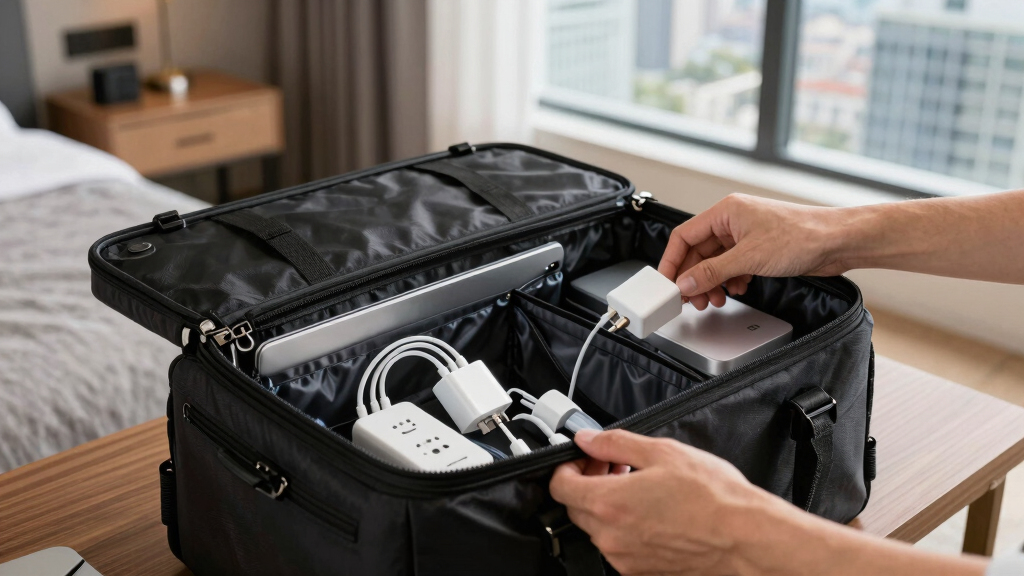
Coil each cable loosely, fasten it with a reusable strap, and add a label. Group charging equipment in one compact, subdivided pouch.
CRemove duplicates
Match every cable and charger to a device or planned meeting need.
Protect devices
Add sleeves, cases, screen covers, and anti-static storage where appropriate.
Assign compartments
Give every item a fixed location based on urgency and frequency of use.
Rehearse access
Confirm the laptop and tablet can be removed without unpacking the bag.
The essential electronics checklist
Weight adds up quickly. Prioritize equipment that directly supports meetings, communication, charging, and data continuity.
| Item | Typical size / capacity | Approx. weight | Primary role | Packing treatment |
|---|---|---|---|---|
| Laptop | Up to 15 inches | 2–3 kg | Core work and presentations | ✓Padded quick-access sleeve |
| Tablet | Approx. 10 inches | Approx. 0.5 kg | Notes and lightweight review | ✓Separate screen-safe slot |
| Power bank | 10,000–20,000 mAh | 0.3–0.5 kg | Charging during transit | ✓Accessible carry-on pocket |
| Chargers and cables | Compact multi-port kit | 0.2–0.4 kg | Power and connectivity | ✓Labeled 1-liter organizer |
| External SSD | 1 TB or more | Approx. 0.2 kg | Backup and data transfer | ✓Padded anti-static case |
| Universal adapter | Compact and foldable | Approx. 0.4 kg | International power access | ✓Power pouch with plug guide |
Protect hardware and the data inside it
Physical padding prevents impact damage; digital preparation limits the consequences of theft, loss, or an unsafe connection.
Physical protection
Create a buffer around screens, drives, and ports. Keep hard, dense accessories away from fragile device surfaces.
- Padded sleeve for every laptop or tablet
- Hard case when bags may be stacked or compressed
- Anti-static pouch for sensitive drives and components
- Loose cable coils to prevent connector strain
- Microfiber cloth for routine device hygiene
Protection adds bulk, but it lowers the risk of costly repairs, downtime, and data loss.
Digital protection
Prepare devices before departure so sensitive business information stays protected throughout the journey.
- Encrypt confidential files and enable device locks
- Back up essential documents before leaving
- Avoid unsecured public Wi-Fi for sensitive work
- Use RFID-blocking storage for cards and IDs
- Keep devices in sight during screening and transit
Extra preparation takes minutes; recovering from a breach, theft, or lost file can take far longer.
Where organization creates the most value
This practical priority score combines frequency of use, disruption risk, and time saved. It is a packing framework—not a measured industry benchmark.
The security test
You should be able to remove screening-required devices with one opening action and without shifting clothing, documents, or loose accessories.
Transparent pouches make contents easy to verify.
Sleeves and inserts separate fragile gear from pressure points.
Reusable ties keep cables compact without sharp bends.
Tags identify USB-C, HDMI, power, and destination adapters.
A charged power bank and compatible adapter support long days.
Choose features that remove friction
Smart and modular bags are most useful when their features solve a recurring problem. Favor practical access and protection over complexity.
Adjustable compartments
Movable dividers let the bag adapt to short trips, presentation-heavy travel, or a larger mobile-work setup.
01Integrated charging
Built-in cable routing and charging ports reduce clutter, but the internal power bank must still comply with airline rules.
02RFID-blocking pockets
Dedicated shielded sections provide an additional storage layer for cards and identification during crowded journeys.
03The five-link chain to a calmer business trip
Pack · protect · connectHow to Pack Electronics for Quick Security Checks
When you’re hauling through security, time is precious. Keep your laptop, tablet, and chargers in a dedicated, easy-access pouch. Make sure they’re on top of your bag or in a separate compartment that opens easily. Using clear, lightweight pouches helps TSA agents see your devices quickly, speeding up the process. For example, a 15-inch laptop like the Dell XPS 15 fits snugly in a 3-liter pouch, which is just perfect for quick screening.
Pro tip: Always remove electronics from your bag before reaching the scanner. It’s a simple step that prevents delays and avoids having to dig through your bag last-minute.
Why it matters: Transparent compartments not only expedite security but also reduce the risk of forgetting or leaving behind devices. This efficiency minimizes travel stress and keeps your devices accessible for quick use once through security. The tradeoff is that you need to plan ahead and allocate specific pouches for electronics, but the time saved is well worth this small investment in organization.
business travel electronics organizer
As an affiliate, we earn on qualifying purchases.
As an affiliate, we earn on qualifying purchases.
Best Ways to Protect Fragile Devices During Travel
Your laptop, tablet, and smartphone are delicate. Use padded sleeves, hard cases, or custom inserts to cushion against bumps. For instance, a hard-shell case for a 13-inch MacBook Air adds a layer of armor, preventing damage from sudden jolts or stacking. Also, consider anti-static bags for sensitive electronics like external drives or chargers, which can be damaged by static electricity.
Why it matters: Proper protection minimizes the risk of costly repairs or data loss caused by impacts or static discharge. The tradeoff is that added protective gear can increase your bag’s bulk, but it significantly enhances device safety during handling, transit, or accidental drops. This investment in protection ensures your devices remain functional and your data stays safe, which is crucial for maintaining productivity and peace of mind.
transparent tech pouch for security
As an affiliate, we earn on qualifying purchases.
As an affiliate, we earn on qualifying purchases.
Organize Cables and Accessories for Easy Access
Nothing’s more frustrating than tangled cords at the worst moment. Use cable organizers, Velcro straps, or dedicated pouches to keep cables tidy. Label each cable with a small tag or color code them—so your HDMI, USB-C, or power cords are instantly recognizable. For example, keeping all your cables in a 1-liter pouch with compartments for each type helps you grab what you need without rummaging.
Why it matters: Well-organized cables prevent delays and reduce the risk of damaging connectors through unnecessary pulling or twisting. The tradeoff is spending extra time initially to organize cables, but this effort pays off by saving time during packing and troubleshooting, especially when you’re in a hurry. Proper cable management also prolongs the lifespan of your cords and connectors, avoiding the cost of replacements or repairs. This proactive approach ensures you’re always ready with the right cable, avoiding last-minute scrambling and potential device issues.
cable management straps for travel
As an affiliate, we earn on qualifying purchases.
As an affiliate, we earn on qualifying purchases.
The Ultimate Checklist for Electronics Packing
| Item | Size/Capacity | Weight | Ideal For |
|---|---|---|---|
| Laptop | 15-inch (e.g., Dell XPS 15) | 2-3 kg | Business professionals, remote workers |
| Tablet | 10-inch (e.g., iPad Pro) | 0.5 kg | Quick notes, presentations |
| Power Bank | 10,000-20,000mAh | 0.3-0.5 kg | Charging on the go |
| Chargers & Cables | Various (compact pouches) | 0.2-0.4 kg | All devices |
| External Drive/SSD | 1TB or more | 0.2 kg | Data backup, transfer |
| Universal Adapter | Compact, foldable | 0.4 kg | International travel |
Why it matters: Creating a comprehensive checklist ensures you pack only what’s necessary, avoiding overloading your bag which can lead to discomfort, or underpacking, which might leave you without essential tools. Understanding the purpose, size, and weight of each item helps you optimize space and stay within airline restrictions. The tradeoff involves the initial effort to prepare this list, but it streamlines packing, reduces the risk of forgetting critical devices, and promotes efficient use of space, making your travel experience smoother and more organized.
As an affiliate, we earn on qualifying purchases.
Smart Bags and Tech Organizers: The Future of Travel Packing
Tech-savvy travelers love smart bags with built-in charging ports, RFID-blocking compartments, and modular sections. Imagine a bag with a dedicated section for your cables and a built-in wireless charger—no more digging around in your bag. These innovations streamline your packing and protect your data, especially with RFID features guarding against identity theft.
Why it matters: Smart bags and organizers can significantly reduce packing time and improve security by keeping your devices and data protected. The tradeoff is that these tech-enhanced products often come at a higher price point and may require more careful maintenance. However, the convenience of integrated charging and data protection means less fuss on the go, less risk of losing or forgetting accessories, and enhanced security for sensitive information. They are especially beneficial for frequent travelers who want to maximize efficiency and safeguard their digital assets.
Tips for Managing Power and International Adapters
Power management is key. Carry a universal adapter with multiple USB ports, so you can charge several devices simultaneously. A compact, foldable model like the Anker PowerPort Cube fits easily into your tech pouch and works in over 150 countries.
Why it matters: Having a reliable power solution ensures that your devices stay charged during long travel days, meetings, or layovers. The tradeoff is that some universal adapters may be bulkier or heavier, but the convenience of being able to plug in multiple devices worldwide outweighs the added size. Also, investing in surge protection features can prevent damage from voltage spikes, which is crucial when traveling to regions with unstable power supplies. This approach minimizes the risk of device failure and keeps your workflow uninterrupted, especially important in remote work scenarios or critical business meetings.
How to Keep Devices Secure and Data Protected
Data security matters as much as device safety. Use RFID-blocking wallets for credit cards and IDs, especially when traveling through busy airports. Encrypt sensitive files on your devices before departure, and avoid connecting to unsecured Wi-Fi networks.
Why it matters: Protecting your digital information prevents identity theft, financial loss, and data breaches, which can have serious consequences beyond the trip itself. The tradeoff involves some extra steps in preparing your devices, such as encrypting files and carrying additional RFID-blocking gear, but these measures are essential in today’s interconnected world. By taking these precautions, you maintain control over your personal and professional data, reducing the risk of cyber threats while on the move. This proactive security approach ensures peace of mind and safeguards your reputation and assets during travel.
Best Practices for Electronics Packing During Long vs. Short Trips
For short business trips, pack only essentials—laptop, charger, a tablet, and a power bank. Keep everything in a small, organized tech pouch that fits easily into your carry-on. For longer trips, add extra cables, a portable Wi-Fi hotspot, and a backup power source.
Why it matters: Tailoring your packing to the trip duration ensures you have what you need without overburdening your bag. Overpacking can lead to discomfort and difficulty in mobility, while underpacking risks missing critical tools. The tradeoff involves some planning upfront but results in a more efficient, less stressful travel experience. Properly adjusting your packing list based on trip length ensures you’re prepared for work, entertainment, and connectivity needs, maintaining productivity and peace of mind throughout your journey.
Frequently Asked Questions
How can I prevent my electronics from getting damaged during travel?
Use padded sleeves, hard cases, or custom inserts for your devices. Be gentle when packing and avoid stacking heavy items on fragile electronics. Regularly wipe devices with microfiber cloths to remove dirt and prevent scratches.
What are the best organizers or bags for electronics?
Look for bags with multiple compartments, padded sections, and dedicated cable pockets. Modular organizers that fit into your carry-on are ideal. Brands like BagsOK recommend models with built-in charging ports and RFID protection for ultimate flexibility.
How do I manage multiple chargers and cables efficiently?
Use small pouches or cable organizers with labeled sections. Velcro straps or twist ties prevent tangling, and color-coding helps you quickly identify each cable. Keep all your chargers in one compact pouch to streamline packing.
Are there travel-friendly solutions for international power adapters?
Yes, compact universal adapters with multiple USB ports and foldable plugs are best. They work in over 150 countries and can charge several devices simultaneously. Always check airline regulations for lithium batteries, like power banks, before packing.
How can I keep my devices secure and protect sensitive data?
Use RFID-blocking wallets and pouches, encrypt sensitive files, and avoid unsecured Wi-Fi networks. Regular software updates and strong passwords add an extra layer of security during travel.
Conclusion
Getting your electronics organized isn’t just about neatness — it’s about saving time, protecting your devices, and reducing stress. Think of your tech gear as the engine of your business trip; keep it tuned and ready to go. With a little planning and smart accessories, you turn chaos into control, making every trip smoother and more productive.Halloween Picks
halloween
As an affiliate, we earn on qualifying purchases.