TL;DR

Get travel and outdoor gear delivered free with Prime
- Fast, free delivery on millions of items
- Prime Video, Amazon Music and more included
- Member-only deals all year
The best business travel bags feature dedicated, padded compartments for electronics, TSA-friendly access, and smart security options. Modern innovations like USB ports and RFID-blocking pockets keep your gear safe and organized, making travel smoother.
Imagine pulling out your laptop at security, only to fumble through a cluttered bag full of tangled cables and misplaced chargers. Frustrating, right? The right tech compartments can turn that chaos into seamless efficiency. If you’re tired of digging for your power bank or struggling to fit your devices, this guide is for you.
We’ll explore the features that make a travel bag truly smart—dedicated pockets, security tech, and clever organization. Plus, recent innovations are reshaping what’s possible, making your trips less stressful and more productive.
Prioritize bags with padded, TSA-friendly laptop compartments for faster security checks.
Look for multiple organized pockets and sleeves to keep cables, chargers, and accessories tidy.
Choose bags with built-in USB ports and power banks to stay charged on the go.
RFID-blocking pockets and lockable compartments protect your sensitive data and devices.
Smart materials like water-resistant fabrics add extra protection against spills and weather.
Best Tech Compartments in Business Travel Bags
The smartest travel bags turn security-line chaos into a clean, repeatable system. Prioritize padded device storage, TSA-friendly access, organized cable zones, secure pockets, and materials that protect electronics from impact and weather.
What real tech storage looks like
A capable compartment is more than one large padded pocket. It creates a protected place for every device, removes friction at security, and keeps high-use accessories accessible without exposing valuables.
Padded laptop sleeve
Choose a suspended or well-cushioned sleeve sized closely to your device. A clamshell opening makes airport screening faster and reduces repeated handling.
Watch: padding versus unnecessary bulkPurpose-built pockets
Separate sleeves for a tablet, charger, cables, earbuds, cards, and adapters prevent tangles while making every item easier to inventory.
Watch: too many pockets can hide essentialsUSB charging access
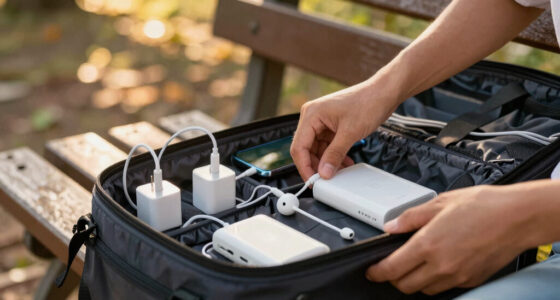
An external port linked to an internal power-bank pocket lets you charge while walking without leaving the battery loose in the main compartment.
Watch: battery weight and heat managementRFID + lockable zones
RFID-lined pockets help shield passports and cards, while lockable zippers add a physical barrier around devices and sensitive documents.
Watch: secure placement must stay accessibleWater-resistant shell
Coated nylon, reinforced seams, sturdy zippers, and a protected base help guard electronics against rain, spills, abrasion, and rough handling.
Watch: durability versus carry weightCompare the compartment strategies
The best configuration depends on device size, security needs, and how often you reorganize. Bag C offers the strongest integrated feature set; Bag B prioritizes flexibility.
| Feature | Bag A · Balanced | Bag B · Modular | Bag C · Secure |
|---|---|---|---|
| Laptop sleeve | 15″ max, padded | 17″ max, semi-padded | 14″ max, padded |
| USB charging port | ✓ | ✕ | ✓ Power-bank zone |
| RFID blocking | ✓ | ✕ | ✓ |
| Water resistance | ✓ | ✓ | ✕ |
| Secure locking | ✓ | ~ Optional | ✓ |
| Removable tech module | ✕ | ✓ | ✕ |
What modern business bags are adding
Charging, tracking, modularity, and lower-impact materials are reshaping the category. These indicators show their relative importance when evaluating a modern tech-focused bag.
Tracking-device pockets
Hidden mounts for Tile or AirTag-style trackers make recovery tools easier to integrate.
Removable tech modules
Move an entire cable-and-accessory kit between bags without repacking each item.
Recycled performance textiles
Lightweight recycled nylon and vegan alternatives aim to balance mobility and durability.
Anti-slip device lining
Grippy internal surfaces reduce device movement when the bag is carried or placed overhead.
Organize your tech like a pro
Build the bag from the largest, most fragile device outward. Every item should have a predictable location based on protection needs and frequency of use.
Measure devices
Confirm laptop and tablet dimensions before choosing a sleeve.
Anchor the laptop
Place the heaviest device in a padded rear compartment.
Group power gear
Keep chargers, cables, and adapters together by function.
Stage quick access
Put phone, earbuds, and travel documents near the top.
Secure valuables
Move cards, passport, and drives into protected pockets.
Buy the layout, not the feature list.
The best tech compartment fits your actual devices, opens cleanly at security, protects data and hardware, and gives every frequently used item one obvious home. Smart extras are valuable only when they preserve that simplicity.
How to Spot a Business Bag with Real-Deal Tech Storage
The first thing to check? Padded, TSA-friendly laptop sleeves. They unzip fully, so you don’t have to wrestle your device out at security. Look for multiple, clearly labeled pockets for chargers, cables, and accessories. A good tech compartment isn’t just about size—it’s about smart layout.
For example, a bag with a dedicated tech zone might have a padded sleeve for your 15-inch MacBook, a separate pocket for your tablet, and small sleeves for earbuds, SD cards, and USB drives. This keeps everything accessible and protected, especially when rushing through airports.
Recent models now include lockable compartments and RFID-blocking pockets. These features protect sensitive data and prevent electronic theft, giving you peace of mind on business trips. Such features are not just security add-ons—they influence your overall travel efficiency and peace of mind. Without them, you risk data breaches or theft, which can be costly and time-consuming to resolve. Choosing a bag with these features reflects a proactive approach to security, but it may also mean additional cost or slight weight increase, which are tradeoffs to consider.
business travel bag with padded laptop compartment
As an affiliate, we earn on qualifying purchases.
As an affiliate, we earn on qualifying purchases.
Compare Top Tech Compartments: What Matters Most
| Feature | Bag A | Bag B | Bag C |
|---|---|---|---|
| Size of Laptop Sleeve | 15″ max, padded | 17″ max, semi-padded | 14″ max, padded |
| USB Charging Port | Yes | No | Yes, with power bank storage |
| RFID Blocking | Yes | No | Yes |
| Water-Resistant Material | Yes | Yes | No |
| Secure Locking | Yes | Optional | Yes |
| Removable Tech Module | No | Yes | No |
Choosing between these depends on your device sizes, security needs, and whether you want modular compartments. For frequent flyers with multiple devices, a bag with a removable tech module (like Bag B) offers unmatched flexibility. However, this modularity can sometimes add complexity or weight, which might impact mobility or ease of use during quick trips. Consider your typical travel scenario—if you often need to switch devices or reorganize, a modular bag could be a game-changer. Conversely, if you prefer simplicity, a well-organized fixed compartment might suffice. The tradeoff is often between flexibility and convenience, so assess your priorities carefully.
TSA-friendly travel backpack with organized tech pockets
As an affiliate, we earn on qualifying purchases.
As an affiliate, we earn on qualifying purchases.
5 Must-Have Features for Your Travel Tech Compartments
- Dedicated, Padded Laptop Sleeve: Fits up to 17″ laptops, easy to unzip at security. This prevents damage during transit and speeds up security checks, but ensure the padding is sufficient to absorb shocks without adding excessive bulk.
- Multiple Organized Pockets: Separate spaces for chargers, cables, SD cards, and earbuds. Proper organization minimizes the risk of losing small items and reduces the time spent searching, which is crucial during tight schedules. Overloading pockets can make access cumbersome, so balance capacity with accessibility.
- USB Charging Port: Built-in ports connect to a power bank inside the bag, keeping devices charged. This feature enhances convenience but requires carrying an internal power source, which adds weight and needs management to avoid overloading or overheating.
- RFID-Blocking Pockets: Protect your passport and credit cards from electronic theft. While they add security, they can sometimes make access slightly slower, so placement and size matter for quick retrieval during security checks.
- Water-Resistant Materials: Shields tech gear from rain or accidental spills. This protects your electronics from damage, but high-end water-resistant fabrics may increase cost or weight. Balancing durability and portability is key.
For example, imagine arriving at a hotel, plugging your phone into the built-in port, and knowing your devices are safe behind RFID protection. These features aren’t luxuries—they’re essentials for modern business travelers. They influence not just safety, but the overall efficiency of your trip, reducing stress and potential setbacks caused by damaged or stolen devices.
USB port travel bag for electronics
As an affiliate, we earn on qualifying purchases.
As an affiliate, we earn on qualifying purchases.
What’s New? The Latest Tech Features in Business Bags
Business travel bags now come with smarter tech features. USB ports are standard, but some take it further with built-in power banks and tracking devices like Tile or AirTags. These help you keep tabs on your bag, even in crowded airports or busy hotels. The integration of these features reduces the risk of losing your bag or running out of power at critical moments, but they can also increase the complexity of your bag’s design and maintenance requirements.
Modular sections let you customize storage, pulling out tech zones when needed or rearranging compartments to fit your gear. This flexibility allows tailored organization but may introduce additional weight or setup time. Lightweight, eco-friendly fabrics like recycled nylon and vegan leather are replacing heavy, traditional materials, which benefits mobility but might impact durability or cost. Lockable, TSA-approved zippers enhance security during scans, but some users find them slightly more cumbersome to operate. Overall, these innovations aim to balance convenience, security, and sustainability, though they may sometimes involve tradeoffs in cost or weight.
For example, a recent model includes an integrated charging port, RFID protection, and a removable tech pouch—saving time and stress during hectic travel days. Such features are increasingly expected but require thoughtful consideration of how they fit into your overall travel needs and budget.
As an affiliate, we earn on qualifying purchases.
How to Organize Your Tech Gear Like a Pro
- Start with a dedicated, padded compartment for your laptop. Measure your device first—most bags fit 15″ to 17″ laptops comfortably. Proper sizing ensures protection without excess bulk, but overly tight compartments can make access difficult and risk damaging your device during insertion or removal.
- Use separate small sleeves for chargers, cables, and adapters. Label or color-code them for quick identification. Organized cables prevent tangling and save time, but over-organization can sometimes lead to clutter if not managed properly. Find a balance that allows quick access without overwhelming your bag’s capacity.
- Place your phone and earbuds in easy-access pockets near the top or side of the bag. Accessibility is crucial during security checks or quick retrieval, but placing items in too many small pockets can cause confusion. Prioritize frequently used items in the most accessible spots.
- Secure sensitive items like passports or RFID cards in lockable, RFID-blocking pockets. This enhances security but may slightly slow down access during quick security scans. Weigh the importance of security versus convenience based on your travel environment.
- Keep a small, removable tech organizer for quick grab-and-go when you need to dash through security. This minimizes packing time and stress, but a bulky organizer could add weight or limit space for other essentials. Choose a compact, lightweight organizer tailored to your needs.
Imagine pulling out your laptop, unzipping the tech sleeve, and having everything else organized and within arm’s reach. That’s the power of smart compartment design. Proper organization reduces travel anxiety and enhances your efficiency, allowing you to focus on your work instead of hunting for misplaced cables or devices.
The Hidden Benefits of Good Tech Compartments
Beyond simple organization, well-designed compartments protect your devices from bumps, spills, and theft. Padding absorbs shocks, water-resistant fabrics keep electronics dry, and RFID blocking shields your data from electronic pickpocketing. These protective features are essential because they directly impact device longevity and data security, which are critical for business travelers relying on their tech gear.
Quick access means less stress during security checks or arrivals. For instance, a traveler with a dedicated tech pocket saved five minutes at security, avoiding chaos and missed flights. Over time, these small efficiencies accumulate, making your travel experience smoother and less stressful. Additionally, good compartments can prevent accidental damage, which might otherwise lead to costly repairs or replacements, further emphasizing their importance in a comprehensive travel security strategy.
Frequently Asked Questions
What should I look for in a business travel bag’s tech compartment?
Focus on padded, TSA-friendly laptop sleeves, multiple organized pockets for cables and accessories, RFID-blocking pockets, and water-resistant materials. These features streamline your travel and protect your gear.Are bags with built-in charging ports worth it?
Absolutely. They allow you to keep devices powered during long travel days without hunting for outlets. Look for models with a dedicated space for a power bank and a durable USB port.How do I keep my tech gear safe during travel?
Choose bags with RFID-blocking pockets, lockable compartments, and water-resistant fabrics. Proper organization and padding also prevent damage from shocks and spills.Which brands lead in tech-friendly business travel bags?
Brands like Tumi, Briggs & Riley, Nomatic, and Away are known for their innovative compartments, security features, and durability—perfect for frequent travelers.Are smart bags with tracking worth the investment?
For frequent business travelers, definitely. They help locate lost luggage quickly and often include charging ports, making your trips less stressful and more efficient.Conclusion
A well-organized, tech-friendly travel bag isn’t just a luxury—it’s a necessity. It saves time, reduces stress, and keeps your devices safe no matter where your business takes you.
Next time you shop for a bag, focus on those dedicated compartments and smart features. Your future self will thank you during those hectic travel days, when everything just falls into place.
Fall Picks
fall essentials
As an affiliate, we earn on qualifying purchases.