TL;DR
Listen free for 30 days with Audible
Thousands of audiobooks and originals — cancel anytime.
Start your free trialAs an affiliate, we earn on qualifying purchases.
Packing tech gadgets safely means using dedicated, padded compartments and waterproof cases, organizing cables, and choosing security features. Recent innovations like smart organizers and anti-theft backpacks help protect devices in transit.
Imagine reaching your hotel after a long flight, only to find your laptop screen shattered or your camera soaked from a sudden rain. That’s a travel nightmare no one wants. If you rely on tech gadgets—laptops, tablets, chargers, or cameras—you need a game plan for packing them safely. This isn’t about stuffing everything in and hoping for the best. It’s about smart, deliberate choices that protect your gear and keep you connected.
In this guide, you’ll learn how to organize, shield, and secure your tech like a pro. Whether you’re carrying a sleek 13-inch MacBook or a bulky DSLR camera, these tips will help you avoid damage, theft, and chaos. Travel with confidence knowing your gadgets are as ready as you are for whatever the road throws at you.
Use padded sleeves and dedicated compartments to prevent physical damage.
Organize cables with labels and pouches to avoid tangles and breakage.
Protect gadgets from rain with waterproof cases and moisture-absorbing packs.
Secure your gear with anti-theft features and keep batteries in carry-on luggage only.
Stay updated with new smart gear that simplifies packing and enhances security.
Protect Your Devices from Physical Damage with the Right Gear
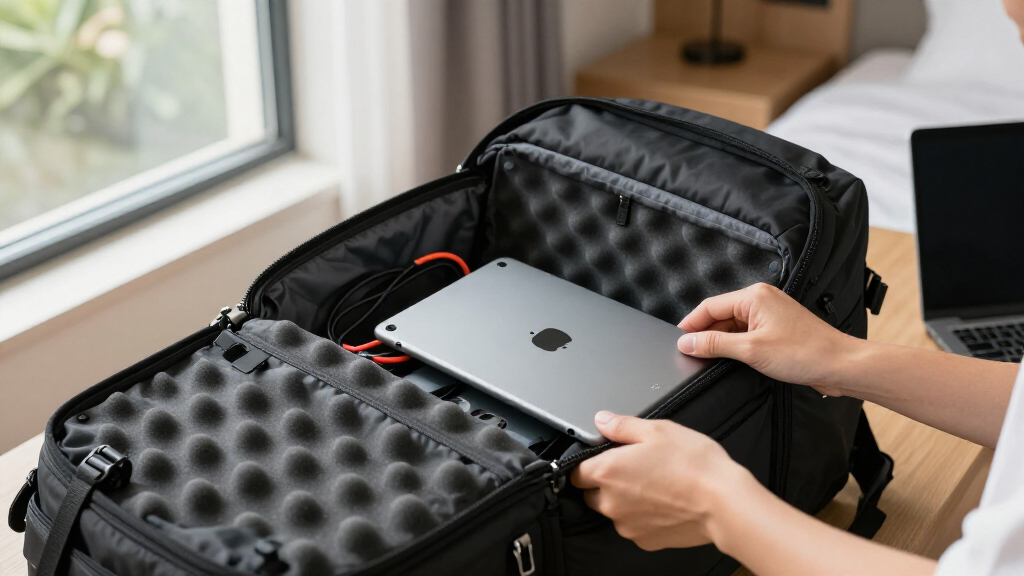
Physical damage is the biggest risk for tech gadgets on the move. Think about the jostling in overhead compartments or the pressure from packed luggage. Using padded cases or sleeves for laptops, tablets, and cameras creates a soft barrier that absorbs shocks. For example, a 15-inch laptop in a 20-liter backpack with a dedicated padded sleeve keeps it from bumping into keys or water bottles.
Place fragile gadgets in the center of your pack, surrounded by clothes or soft items. This acts like a buffer, cushioning accidental knocks. Avoid overstuffing your bag; pressure on screens or delicate ports can cause cracks or disconnections. When packing a DSLR, use a padded camera cube—like the Lowepro Camera Cube—that fits snugly in your main compartment.
Understanding the importance of proper padding is crucial because even minor impacts can lead to costly repairs or data loss. The tradeoff is adding extra bulk, but this sacrifice significantly reduces the risk of damage, making it a worthwhile investment for frequent travelers.
As an affiliate, we earn on qualifying purchases.
Organize Your Gadgets and Accessories for Easy Access
Organization is key. When your gear is in chaos, you waste time searching and risk dropping or damaging devices. Use dedicated compartments or tech organizers—think slim pouches with elastic loops or RFID-blocking sleeves for passports and cards. For instance, a tech organizer with labeled pockets keeps charging cables, SD cards, and adapters separate.
Keeping your gadgets organized isn’t just about tidiness; it impacts your efficiency and safety. Quick access means you can respond swiftly to changing situations, like needing a charging cable during a layover. Proper organization also reduces the chance of accidental damage—like dropping a loose device or crushing it under other items—especially when rushing through security or crowded airports. The tradeoff involves carrying extra pouches, but this investment in organization pays off through smoother travel experiences and device longevity.
As an affiliate, we earn on qualifying purchases.
Protect Your Gadgets from Water and Moisture
Water damage can ruin your gadgets faster than a fall. Use waterproof or water-resistant cases for laptops, tablets, and cameras. For example, a hard-shell waterproof case for your DSLR keeps out rain and splashes. Silica gel packs in your bag absorb excess moisture, preventing corrosion or fungus.
If caught in a sudden downpour, a compact rain cover for your backpack can shield your gear. Remember, even a small spill can cause internal damage. Always store electronics away from water sources and in protective casings. The implications are significant: water exposure can lead to short circuits, data loss, or complete device failure. The tradeoff of carrying waterproof gear is often increased weight or cost, but the peace of mind and protection against unpredictable weather make it essential for serious travelers.
As an affiliate, we earn on qualifying purchases.
Manage Cables and Accessories Without the Tangle Terrors
Cables are notorious for knotting into spaghetti, risking frays and breakage. Use cable organizers—zippered pouches or Velcro straps—to keep each cord neat. Label each cable with a sticker or a small tag, so you know exactly what’s inside without digging through clutter.
A practical tip is to coil each cable neatly, secure it with a Velcro tie, and store it in a dedicated pocket. This prevents damage and saves time when you need to connect or disconnect devices. Proper cable management not only reduces physical wear but also minimizes the frustration of searching for the right cord in a mess. The tradeoff involves carrying additional organizing accessories, but the benefits of quick, damage-free access outweigh the inconvenience.
As an affiliate, we earn on qualifying purchases.
Keep Your Devices Safe and Secure During Transit
Security measures aren’t just for airports. Use lockable compartments or backpacks with anti-theft features—like hidden zippers or cut-resistant fabric—to deter theft. When in crowded places, keep gadgets close to your body or in lockable pockets.
RFID-blocking sleeves protect sensitive info on passports and credit cards from electronic pickpocketing. For instance, a backpack with a lockable main zipper combined with RFID-blocking pouches means your data stays safe even in bustling markets.
Understanding the implications of theft and data breaches emphasizes why security features matter. The tradeoff might be slightly heavier or more expensive gear, but the increased safety and peace of mind justify the investment. Remember, always carry lithium-ion batteries—like power banks—in your carry-on, not checked luggage, due to fire risks. Airline rules strictly prohibit placing such batteries in checked baggage.
Latest Tech Travel Gear to Make Packing Safer and Smarter
Technology keeps evolving—so does your gear. Smart organizers with built-in charging ports and RFID protection are rising in popularity. Anti-theft backpacks now feature lockable zippers and hidden compartments. Wireless power banks are compact, lightweight, and can charge multiple devices on the go.
Waterproof, rugged cases for smartphones and tablets shield against extreme conditions. Investing in these can extend your gear’s lifespan. For example, a 20,000mAh wireless power bank can keep your phone fully charged during long travel days.
Frequently Asked Questions
How can I protect my laptop and tablet from damage during travel?
Use padded sleeves or cases specifically designed for your devices. Place them in the middle of your bag, surrounded by soft clothing or packing cubes. This absorbs shocks and prevents cracks or scratches during transit.
What are the best ways to organize cables and accessories?
Use small zippered pouches or cable organizers, and label each cable with tags or stickers. Coil cables neatly, secure with Velcro straps, and store them in dedicated compartments for quick access and to prevent tangling.
Are there specific backpacks designed for tech travelers?
Yes, look for backpacks with dedicated tech compartments, lockable zippers, RFID-blocking pockets, and cut-resistant fabrics. Brands like Pacsafe and Nomatic offer models tailored for secure, organized tech travel.
How do I prevent my gadgets from overheating or getting wet?
Use waterproof cases or covers, and store electronics in breathable, moisture-absorbing packs. Avoid leaving devices in direct sunlight or in hot cars, which can cause overheating or damage internal components.
What security measures should I take to keep my devices safe?
Keep gadgets close to your body, use lockable compartments, and employ RFID-blocking sleeves for sensitive info. Always carry lithium-ion batteries in your carry-on luggage, as airline regulations prohibit placing them in checked bags.
Conclusion
Smart packing turns a chaotic backpack into a fortress for your tech. Think of it as giving your gadgets a protective suit, ready for any bump or splash. When you pack with intention, you travel lighter, safer, and more confidently.
Next trip, focus on organization, protection, and security. Your devices will thank you—just like you’ll thank yourself when everything arrives intact and ready to go. So, gear up smart, pack right, and travel with peace of mind.
Flea & tick season Picks
flea and tick prevention
As an affiliate, we earn on qualifying purchases.